
Glencoco
Glencoco is a marketplace for outsourced cold calling - companies post outbound campaigns, and freelance callers train on them, dial from the platform, and get paid per booked meeting. As the founding designer, I led the design from scratch and launched in 4 months, reaching 500+ callers, 2,100+ booked meetings, and a $6M pipeline.
Role: Founding Product Designer
Team: 4 Engineers
Duration: 9 months
Industry: Sales Technology
The Problem
When I joined, Glencoco had shipped an MVP, but it ran on disconnected third-party tools. My work was to replace that arrangement with a product of its own.
I interviewed 12 users on the cold calling side. Callers work on commission, so every failure came out of their earnings, and the platform was failing them in three ways:
Unreliable tech - Glitches mid-call, in front of a live prospect.
Poor lead data - Dead numbers and wrong contacts wasted their time.
No feedback loop - No way to see what they were doing wrong.
A marketplace without callers has nothing to sell companies. Therefore, the caller experience was the prerequisite for the marketplace itself.
The Approach
Engineering had scoped the core features before I joined: from sign-up, training, calling, to the dashboard. My core responsibility was to understand how to design for each experience. I mapped the caller's full journey against the three failures from research, which told me where the interface had to intervene and where it had to get out of the way.
Recording what happened on the call
Of the three surfaces, the disposition sat where the caller's interest and the platform's ran against each other. Lead quality was callers' biggest frustration, but fixing it meant asking callers, who are paid to dial, to stop and fill out a form. The first version was a nested survey with follow-up questions; it captured detail and killed momentum. I cut it to one disposition, a note, and a skip button - less data per call, from far more callers.
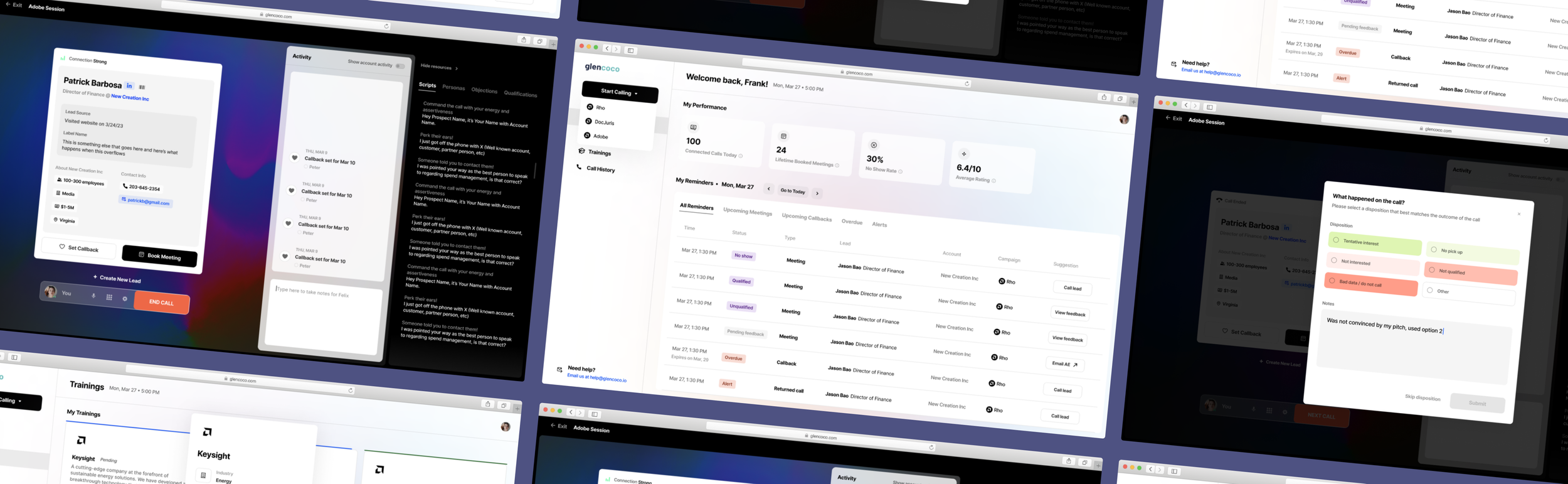
Call Center (Post-call) - After a call, this pop-up would showcase colored disposition options - letting consultants share what happened on the call while still moving fast or adding detail when needed.
Other screens
Call Center (Pre-call) - A 10-second checkpoint to verify settings before dialing - addressing common support requests before they happen.
Call Center (During call) - Lead info and resources embedded in the call view so consultants stay present instead of switching tabs.
Dashboard - Tasks and calendar in a single view.
Training Center - Fit criteria surfaced upfront so consultants self-select before investing in training.
Revisiting the Dashboard
A stakeholder requested a single view of the dashboard combining the task list and the calendar. It shipped with the launch, but it didn't hold up: tasks buried scheduled events, and scheduled events fragmented the task list.
Flaws with the original dashboard
Three months into a four-month timeline, as the only designer on the team, with a stakeholder to satisfy, I built what was asked.
After leaving Glencoco, I returned to it - an unsolicited audit of my own work and an account of how I'd design it now.
Design Decisions
The audit came down to one question: what does a consultant need the moment they open the platform? Two decisions followed.
Actionable Hierarchy
I kept daily progress stats at the top for quick reference and used a chronological call list with simple filters to eliminate unnecessary categorization.
Strategic Deletion
I made the critical decision to remove meeting management entirely. Since meetings are between leads and AEs, consultants shouldn't be responsible for reminders. This cleared the path for a dashboard focused purely on active calls.
Features of the redesigned dashboard
Redesign Results
The redesign highlights actionable statistics while focusing on scheduled calls. By moving supplementary tasks like alerts and meeting reminders off the homepage, consultants can now start each day knowing exactly what to do next.
Side-by-side of the original and redesigned dashboard
Impact & Takeaways
Each of the three failures had an answer - verification before the call, dispositions that routed lead quality back to the campaigns, a dashboard that made progress visible.
The clearest signal came from the consultants themselves: the Slack channel shifted from bug reports to feature requests. Callers stayed, and in four months the platform reached 500+ of them, booking 2,100+ meetings into a $6M pipeline.
With the caller side holding, the business side became worth building - campaign upload, management, and reporting, drawn from the same research.